
What is Bug tracking? Process, Metrics, and Tool Selection

Bug tracking allows testers to record, retrace, and review bugs before production releases throughout the testing cycle.
With bug tracking reports, teams can monitor metrics such as total bugs, priority distribution, severity and density, resolution, and clustering to identify recurring flaky bugs and resolve them.
This article focuses on what bug tracking is, its importance, how to resolve recurring bugs, the challenges involved, and how to choose the right tool.
Record, Reproduce, and Report Bugs Easily
What is Bug Tracking in Software Development?
Bug tracking is the systematic process of identifying, logging, prioritizing, and resolving software errors throughout the software development lifecycle (SDLC).
As per the research, software bugs cost the US economy $59.5 million globally. Missing out on bugs causes a domino effect. Software teams need to first compile the underlying code, which in turn bumps other code changes. So it’s not just the bug that disrupts, but the changes made after every new pull request.
A structured bug tracking system helps development and QA teams identify bottlenecks in resolution, track recurring bugs, and maintain visibility into product quality.
When logging a bug, teams typically capture details such as
- Bug description
- Bug severity and priority
- Bug status
- Steps to reproduce
- Expected and actual results
- Platform and test environment
- Supporting evidence, such as screenshots or logs
Modern bug tracking systems often integrate with testing, development, and project management tools, giving teams a centralized view of defects and their resolution status.
Why Bug Tracking is Essential for Software Teams
Identifying, tracking, and managing bugs gives QA and development teams shared visibility into issue status, ownership, and resolution progress throughout the testing lifecycle. This improves application stability and usability.
For example, a login flow may work correctly for registered users but fail when a guest user attempts to continue to checkout. A detailed bug report helps the team capture the affected user state, reproduction steps, environment, and failure details.
Here are key reasons why bug tracking is essential for software teams:
- Improved collaboration: Centralized tracking enables testers, developers, and managers to share updates and stay aligned on issue ownership and progress.
- Faster resolution: By assigning bugs with clear priority levels, teams can focus on critical issues first, reducing turnaround time and improving release efficiency.
- Data-driven insights: Tracking historical data helps teams identify recurring issues, root causes, and trends, allowing better planning for future sprints and releases.
- Enhanced product quality: A disciplined tracking approach minimizes overlooked defects, leading to more stable, reliable, and user-friendly software.
- Increased accountability: Each bug has a clear assignee and status, making progress measurable and ensuring responsibility is never diluted.
Read More: Top Bug Tracking Systems in 2026
How to Track Bugs: Step-by-Step
An effective bug tracking workflow guides defects through a structured process, helping teams validate fixes before they reach production.
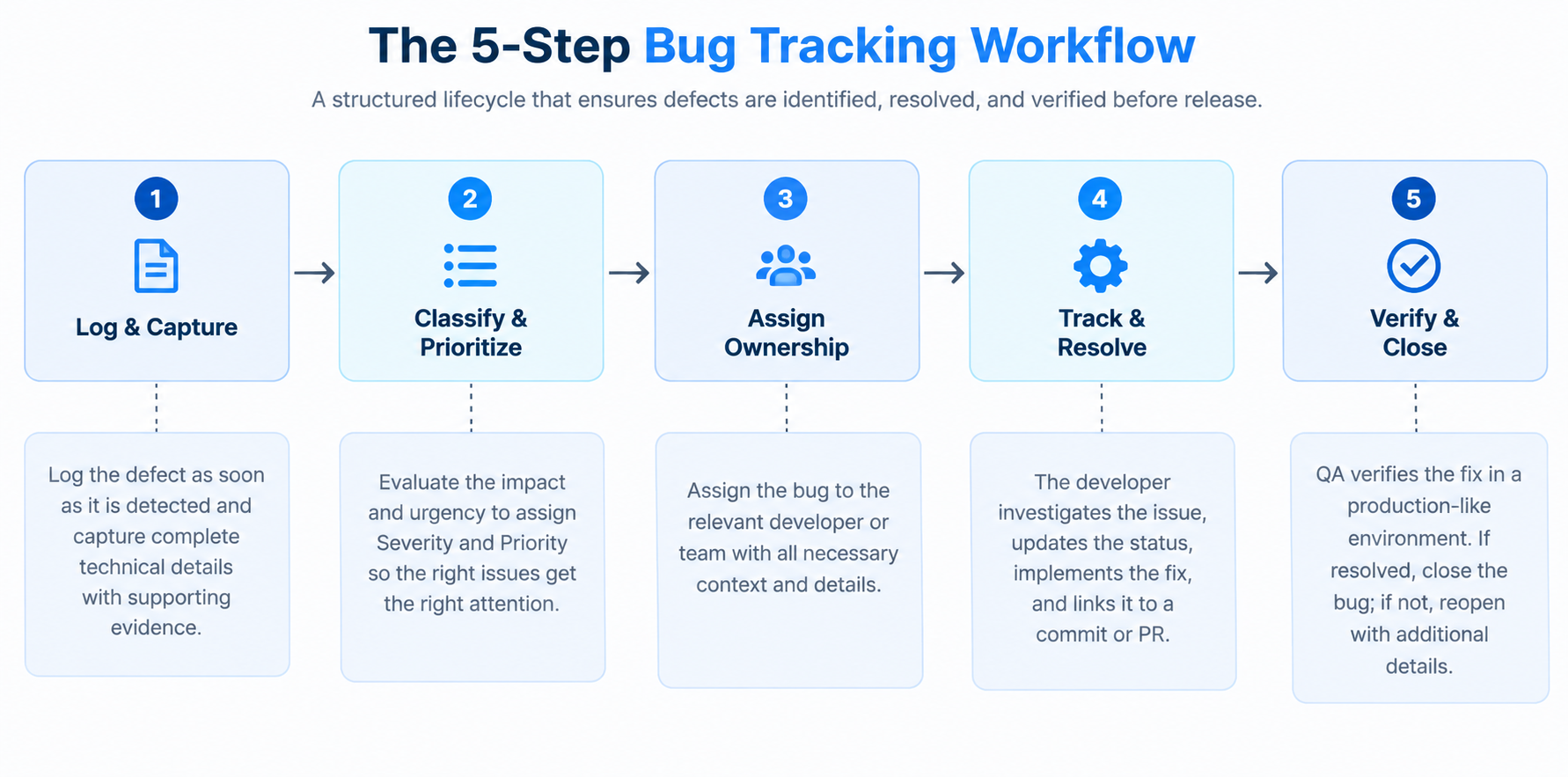
Step 1: Log and Capture Technical Details
Log the bug immediately upon detection during manual or automated test execution.
A comprehensive report should include a clear title, description, reproduction steps, expected and actual outcomes, environment details (such as the OS, browser version, and screen resolution), and supporting evidence, such as console logs, HAR files, and video recordings.
Read More: How to Write a Complete Bug Report.
Step 2: Classify and Prioritize
Evaluate the defect's impact on users and system functionality to assign severity (e.g., critical, major, or minor) and its business urgency to assign priority (e.g., high, medium, or low).
Read More: Bug severity vs. bug priority
Step 3: Assign Ownership
Route the logged bug to the designated developer or feature team with all diagnostic context intact. Direct assignment reduces delays and establishes clear responsibility.
Step 4: Investigate and Resolve
The developer investigates the defect, updates the state (e.g., In Progress, Under Review), writes the code fix, and links the fix to a pull request (PR) or commit reference.
Step 5: Verify and Close the Bug
Verify and close the bug, and retest the fix to confirm that the original issue no longer reproduces and that the change has not introduced regressions.
If validated, the bug is marked "Closed." If the failure persists, it is marked "Reopened" with additional logs attached.
Read More: How to find bugs in your application in 2026?
The Bug Life Cycle: States and Transitions
The bug lifecycle describes the start-to-end state that a bug moves through the testing pipeline. Most bug trackers enforce this state machine directly, and it's what makes metrics like bug reopen rate, bug backlog, and aging meaningful in the first place.
A typical life cycle looks like this:
- New: The bug has just been logged and hasn't been triaged yet.
- Assigned: a developer or feature team has been given ownership.
- In progress: the developer is actively working on a fix.
- Fixed: a code change has been made and linked to a commit or pull request.
- Retest: QA re-executes the original reproduction steps against the fix.
- Closed: The fix is verified, and the bug is resolved.
- Reopened: If a retest fails, the bug returns to active development with the new failure evidence attached, rather than starting over as a fresh report.
Skipping “states” or letting bugs sit in “unassigned” leads to longer debugging delays, bigger bug backlogs, and higher bug density.
Research for IBM states that a defect caught after release cost several times more to fix than one caught at design time. It can run up to roughly 100 times more than one caught during the test maintenance stage.
So a bug that skips verification and gets reopened in production is far more expensive than one caught cleanly on the first retest.
Key Bug Tracking Metrics and KPIs
Teams should define a consistent set of bug tracking metrics that QA, development, DevOps, and engineering teams can review.
Tracking bug resolution trends helps teams identify whether defects are being resolved efficiently and where bottlenecks are slowing the workflow.
These metrics are most useful when analyzed together. For example, a short resolution time combined with a high reopen rate may indicate that bugs are being closed before fixes are fully validated.
Reviewing the metrics across the workflow helps teams identify where defects accumulate and where improvements will have the greatest impact.
Read More: 7 Root Causes For Software Defects and How To Overcome Them
Bug Tracking vs. Defect Management: Key Differences
The bug tracking and defect management are related but focus on different aspects of debugging:
Bug tracking is primarily about managing individual issues. Defect management builds on bug tracking by using defect data to identify trends, address root causes, and improve the overall development process.
import pytest

@pytest.hookimpl(tryfirst=True, hookwrapper=True)
def pytest_runtest_makereport(item, call):
    outcome = yield
    rep = outcome. get_result()

    # Automatically capture details when an automated test fails
    if rep.when == "call" and rep.failed:
        driver = item.funcargs.get('driver')
        if driver:
            # Capture screenshot and console logs for the bug tracker
            driver.save_screenshot(f"failure_{item.name}.png")
            logs = driver. get_log("browser")
            with open(f"logs_{item.name}.txt", "w") as f:
                f.write(str(logs))
JavaScript / TypeScript (Playwright):
import { test, expect } from '@playwright/test';

test. afterEach(async ({ page }, testInfo) => {
  // Automatically capture artifacts for bug reporting upon test failure
  if (testInfo.status !== testInfo.expectedStatus) {
    const screenshotPath = `screenshots/failure-${testInfo.title}.png`;
    await page. screenshot({ path: screenshotPath, fullPage: true });
    console.log(`[Bug Tracker Artifact] Saved failure screenshot to ${screenshotPath}`);
  }
});
Using automation tools that capture relevant failure artifacts can give teams the context needed to reproduce and investigate application-specific defects.
How to Choose the Right Bug Tracking Tool
Selecting a bug tracking platform requires balancing usability, customizability, framework integration, and automated reporting capabilities.
Evaluate your existing testing workflow, the types of defects your team commonly investigates, and the integrations required before selecting a bug tracking tool.
Some tools provide built-in issue reporting and automated evidence capture, while others focus primarily on workflow management and issue tracking.
Cross-browser and real-device testing can also help teams reproduce issues in the environments where users encounter them and capture the technical context needed for investigation.
Common Bug Tracking Challenges and Solutions
Even with structured processes, software teams often face challenges that slow down bug resolution or reduce tracking effectiveness. Recognizing these challenges and applying practical solutions ensures smoother workflows and higher software quality.
Challenge 1: Incomplete or Poor Bug Reports
Many bugs are logged without sufficient detail, making it hard for developers to reproduce or fix them.
Solution: Encourage testers to provide full context, including steps to reproduce, screenshots, environment details, and logs. Tools like BrowserStack Bug Capture simplify this by automatically capturing technical details while reporting, ensuring every bug has actionable information.
Challenge 2: Low Team Collaboration
When developers, testers, and managers work in silos, communication gaps can delay bug resolution and cause misunderstandings about priority or status.
Solution: Use a centralized bug tracking system that supports comments, attachments, and notifications. Regular status updates and integrated workflows ensure all stakeholders are aligned.
Challenge 3: Difficulty Prioritizing Bugs
Without clear prioritization, teams may waste time on minor issues while critical bugs remain unresolved, impacting release quality.
Solution: Establish a clear severity and priority framework. Track metrics such as bug impact on functionality and user experience to guide resource allocation effectively.
Challenge 4: Reopened or Recurring Bugs
Bugs that resurface after being marked resolved indicate insufficient testing or unclear reporting, reducing confidence in the tracking process.
Solution: Implement thorough verification after fixes and use detailed logging for reproducibility. Analyzing defect patterns can also help identify root causes and prevent recurrence.
Challenge 5: Overwhelming Volume of Bugs
Large projects may generate hundreds of bug reports, making it hard to manage, track, and resolve issues efficiently.
Solution: Categorize bugs by module, severity, and priority, and leverage automation features in bug tracking tools. Features like BrowserStack Bug Capture’s integration with issue trackers allow teams to streamline reporting and manage large volumes without losing oversight.
Challenge 6: Overcomplicated bug tracking workflows
A detailed bug tracking process does not always improve defect resolution. Too many mandatory fields, approval stages, status changes, or metrics can slow reporting and create unnecessary administrative work.
Solution: Keep the workflow proportional to the team's needs. Capture enough information to reproduce, prioritize, and resolve the issue without making reporting unnecessarily complex.
Conclusion
A robust bug tracking system should fit your team's workflow, capture the context needed to reproduce defects, and provide metrics such as MTTR, bug reopen rate, resolution time, and defect density to identify bottlenecks.
The right solution should also help teams assign ownership, track issues through resolution, and verify fixes while reducing back-and-forth between QA and development.
Streamline your debugging workflow by integrating BrowserStack Bug Capture into your testing stack, capturing visual proof, browser logs, and network details in a single click.
Data-rich bug reports loved by everyone
Get visual proof, steps to reproduce and technical logs with one click


Continue reading


Put your knowledge to practice
Try Bird on your next bug - you’ll love it
“Game changer”
Julie, Head of QA


Overall rating: 4.7/5
Try Bird later, from your desktop
