
Bug Severity vs Priority: Differences, Levels, and Classifications
The key to efficient debugging is knowing which bugs to prioritize and which to not.
A bug that’s severe might not be urgent, and a bug that’s urgent might not be severe. As your application works based on multiple dockers and sessions, the key is to know which bugs need to be attended to immediately and which can be parked for later.
That’s why it is important to distinguish between bug severity and priority. A checkout crash hitting 2% of users on a deprecated payment method might be more severe, technically, than a home page typo. But if that typo directly affects customer experience, it will be low severity and high priority.
This article explains the difference between bug severity and priority, outlines severity levels and classifications, and provides practical methods to assess them accurately.
Record, Reproduce, and Report Bugs Easily
What is Bug Severity?
Bug severity refers to how deeply the identified software defect can break and impact the app’s overall efficiency and performance. If the severity index is low, it will still hinder the app usage experience, but users might rarely explore the “deformed” feature that has a bug.
If it is high severity, like a broken transaction getaway or inaccurate pricing visuals across multiple categories for the same product, then it is considered a “high-priority bug that needs to be fixed soon.”
Severity and priority determine what gets fixed first; getting them wrong can cause immediate business damage and let cosmetic tweaks take precedence."
Research shows most apps contain 15–50 defects per 1,000 lines of shipped code. Teams can't fix every issue, so they triage by severity and priority.
Why Is Bug Severity Classification Important?
Bug severity classification determines which software bug should be resolved first and which one can be parked for later.
Classifying bug severity helps allocate testing bandwidth to only those pages or dockers that need immediate resolution, thus saving production and execution time. Here are the reasons why you should evaluate severeness and act accordingly.
- Prevents critical issues from slipping through: A payment‑blocking crash and a tooltip typo can appear in the same bug report if no severity is recorded.
- Keeps bug triage objective: Severity means "How much can this feature technically break?" Separating that from "How loud is the person reporting it?"
- Makes release decisions defensible: Saying "we shipped with this bug open" is a much easier conversation when you record severity beforehand rather than it coming as a surprise later.
- Protects engineering time: When developers aren't repeatedly pulled into minor UI fire drills and don't later discover that a small issue broke a core workflow, they can focus on core engineering work.
- Creates a shared vocabulary across QA, dev, and product: Everyone arguing about the same bug is faster when "critical" means the same thing to all three teams, instead of each team having its own mental scale.
- Feeds directly into priority decisions: You can't reasonably decide when to fix something until you've established how badly it's broken; severity is the input, and priority is the output.
Identifying and fixing severity issues prevents any UI production from being found later on, after the release stage, which truly impacts user experience.
Bug Severity Levels: From Minor to Critical
Bugs can range from minor bugs, like a button text capitalization issue, to critical bugs, like the inability to deselect items from an abandoned shopping cart of an e-commerce website.
Severity isn’t a single yes/no judgement. It is an evaluation of how badly an app is broken and how urgently it needs to be fixed. Most teams classify severity into 4 levels.
Here are the 4 levels of bug severity along with a type of example of each level.
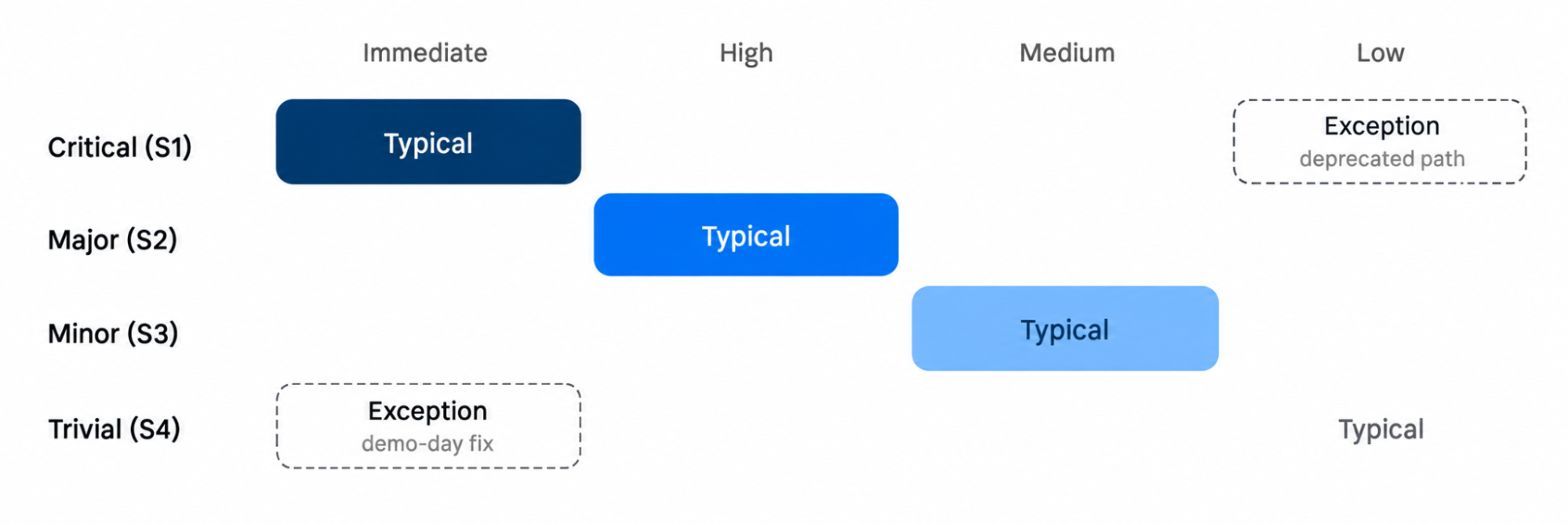
1. Critical (S1): Data Loss Affecting Many Users
The severity of the bug breaks a whole window UI, and it has to be rolled back on an urgent notice. Testing on production can reasonably continue until it’s fixed.
For example, if the payment gateway fails during checkout, no bookings or purchases will be completd.
2. Major (S2): Significant component crash
S2 doesn't mean the whole app has crashed; it means a major component isn't responding to user actions
Example: loyalty points don't apply automatically at checkout, so support must manually credit them.
3. Minor (S3): Cosmetic UI Alignment
The bug affects a direct site action that breaks consumer engagement. For example, When users clear a search, the 'pet-friendly' filter stays on. So users must reselect it or refresh. However, search and booking still work."
4. Trivial (S4): Visual Minor Inconsistency
The defect is a minor visual or design defect that doesn’t have any functional impact. For example, a currency symbol is slightly misaligned on one pricing card on the coupon page.
Each type of bug informs the developer where they need to work and fix things. For example, a critical bug means a function itself has stopped working, a major bug doesn’t disrupt a function but heavily breaks user experience, and minor and trivial bugs aren’t as dangerous and can be fixed later.
If you are unsure which level a bug belongs to, ask, "Does this block the core function, need a workaround, interfere with operations, or just look bad?" Figuring that out will help you to know where to direct your debugging efforts.
Common Bug Severity Assessment Mistakes
Many teams struggle to assign the right severity because of unclear criteria or rushed evaluations. Below are some frequent mistakes testers make while assessing severity and how they can be avoided.
- Basing severity on visibility instead of impact: Testers sometimes mark visually noticeable bugs as severe even when they do not affect functionality. Severity should always reflect the technical and operational impact, not how noticeable the bug is to users.
- Ignoring the business context: The same defect can have different severity levels depending on where it occurs. For example, a crash on a payment page carries higher severity than the same issue on a help page. Testers should always assess how a defect affects business-critical functions.
- Failing to differentiate severity from priority: Severity measures impact, while priority measures urgency. Treating them as interchangeable can lead to wrong fix orders. A low-severity but high-priority bug, such as a typo in a marketing campaign message, may still need an immediate fix.
- Overlooking dependencies between modules: Sometimes a defect seems minor in isolation but triggers failures in dependent modules. Testers should analyze how a defect propagates before deciding its severity level.
- Skipping re-evaluation after fixes or updates: Once a bug is fixed or a feature changes, severity should be reassessed. Outdated classifications can lead to confusion during regression testing.
What is Bug Priority?
Bug priority is a method to determine how urgently a bug has to be fixed, based on the internal as well as the external damage it causes to the software.
Where severity asks how deep the impact of the bug is and whether this needs to be fast forwarded or not, priority is an established decision to remove a certain bug.
Priority is typically set by product and engineering together, based on other factors such as business context, community impact, revenue hit, customer commitments, and how visible the bug is to people that matter.
For example, a hotel booking site has a bug where the “sort by hotel rating” result always shows options in the wrong order. It is still counted as a minor severity issue because the booking flow still works. But if the guests look at a property rated “8.9” and then navigate to the property rated "3.5," the bug jumps to the top priority queue.
If you are conducting a live marketing demo of this website for your travel partners or investors, you absolutely cannot afford to mess up the hotel consumer ratings in the UI. That’s how, even after being a minor issue, this bug is of the highest priority. It has to be fixed before the demo.
Severity is a fix by the nature of the bug itself, while priority shifts based on what’s happening around it: a deadline, a consumer, or a release date.
Why Is Bug Priority Classification Important?
Bug priority is a mandatory task. Developers tend to execute app tests multiple times to check which ones need highest priority. It matters more than most teams assume. A ScienceDirect study found 8.3% of bugs have priority changes, usually within days."
Priority determines whether a bug is fixed this sprint or deferred. The process requires ongoing evaluation throughout the testing lifecycle.
- Determines who works on it and when: Priority decides whether a bug lands with a frontend engineer this sprint or gets parked for a senior developer next quarter. Without it, work gets assigned by who's free, not by what matters.
- Prevents the loudest bug: When a bug is left unclassified, priority usually goes to the most recent or most complained‑about report instead of the issue with the greatest business impact
- Keeps release timelines realistic: A clear priority queue helps teams know what must ship now and what can wait. It classifies issues up front and flag changes in the business context to avoid repeated triage.
- Reduces wasted re-testing: Priorities shift mid-lifecycle more than teams expect. Classifying clearly upfront and flagging when business context changes cuts down on repeat triage.
- Aligns QA, product, and engineering on urgency: The priority system gives QA, product, and engineering a shared urgency language: calling something P1 triggers the same emergency response across teams.
Bug Priority Levels: From Low to Urgent
A bug that immediately wrecks visual UI and consumer experience is a high-priority bug. A bug that might be severe but doesn’t appear often in standard workflows can be low priority and dealt with later.
A bug can sit on any priority level regardless of its severity, since priority is defined by external customer impact.
- Urgent (P0): Urgent priority bugs need to be fixed immediately since they cause greater revenue or consumer damage. They need to be fixed in production itself. For example, the "confirm booking” button stops responding at checkout during high-traffic sale weekends.
- High (P1): These errors should be fixed in the current test run, in the beta test execution cycle itself. For example, when guests try to use a valid promo code at checkout but can’t, that doesn’t mean they can’t complete the booking.
- Medium (P2). P2 is a parking lot for the upcoming software release. Example: the "sort by rating" filter occasionally returns stale results after a page refresh. It is annoying, but most users don't notice or don't rely on it heavily.
- Low (P3). Testers can park these bugs for later or batch them with other small cleanups. Example: a hover tooltip on the amenities icon shows outdated wording. It doesn't affect anyone's ability to book or browse.
Bug priority shows that the UI has issues and the damage it can cause to your website. It lets you evaluate which bug needs to be prioritized first.
The priority timing is set by business context: traffic, revenue, deadlines, and visibility. And not how broken the bug actually is.
Common Bug Priority Assessment Mistakes
When low-priority bugs are classified as high-priority, teams face recurring production issues and internal conflict. Here are the most frequent mistakes teams make while assessing priority and how to avoid them:
- Treating severity as priority: A high-severity bug in a rarely used feature may not be urgent, while a low-severity bug that harms customer sentiment can be urgent.High severity does not automatically mean high priority.
- Auto prioritization by volume: A bug reported by ten users shouldn't automatically outrank a quietly widespread bug affecting thousands. Don’t go by the external noise; rather, check out the bug report to assign priority.
- Letting ease of fix drive the queue: Quick fixes are done faster than harder, function-based fixes. Keep on retesting your test scripts to find hidden bugs that might not have surfaced during production.
- Setting priority once and never revisiting it: Prioritizing a bug as medium during a quiet phase can become urgent when the release schedule accelerates. Teams that set a fixed priority queue can struggle to reassign priorities later on.
- Skipping business input: When only the tester who logged the bug sets priority, it can miss context like a service level agreement or upcoming releases. Priority calls need product or business teams, not just QA's alone.
Accurate priority classification depends on context, not on a report that says “this is broken” or “10 IT tickets were released for this bug." You have to dig deeper into your bug metrics and shortlist bugs based on the potential of their damage on real device platforms
Case study: Using a Bug Severity-Priority Matrix to Classify Bug
To fully grasp how severity and priority differ, plot them on a 2x2 grid and assess where each bug fits. This makes mismatches easy to spot, which is where the triage goes wrong.
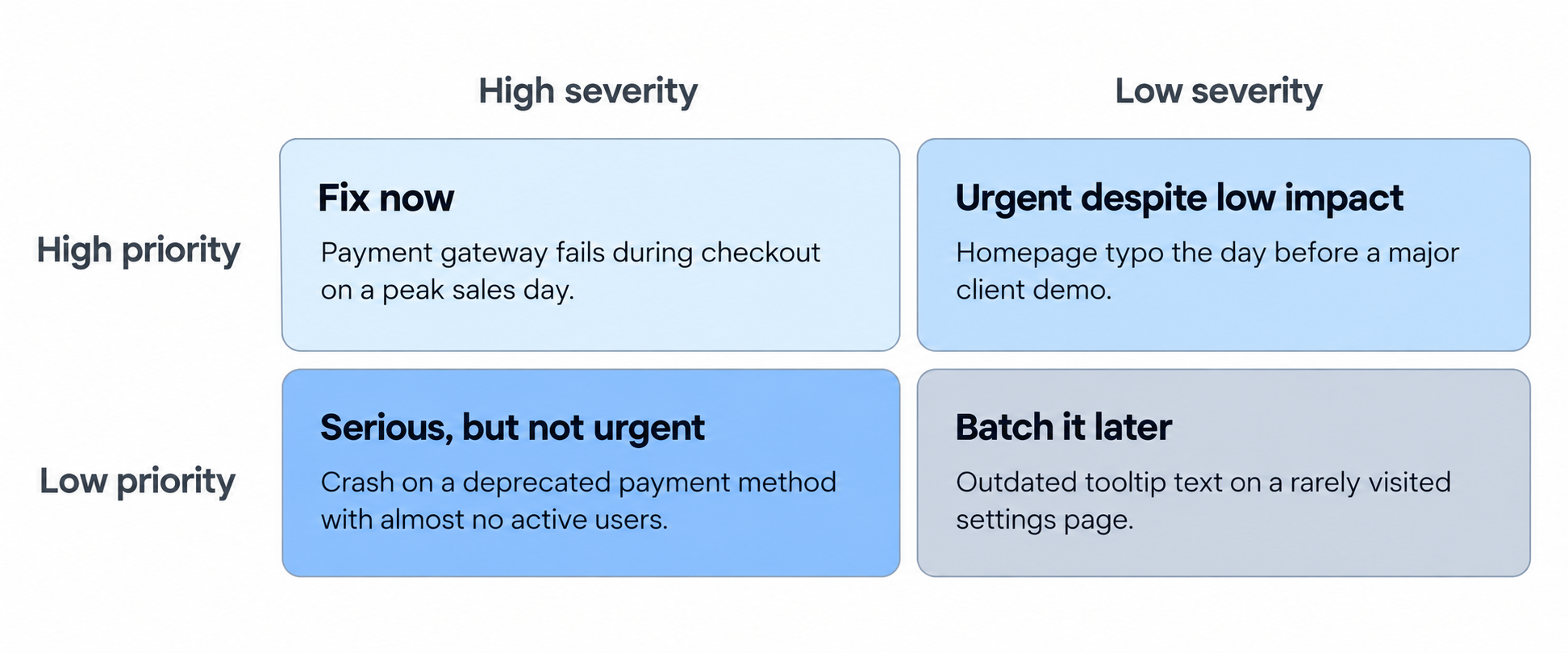
- High priority, high severity-fix immediately: Needs immediate fixing, as it can cause the app to misbehave. Example: The payment gateway fails during peak sales, causing revenue loss every minute.
- High priority, low severity- a cosmetic issue: A cosmetic issue is minor but business needs make it urgent; for example, a homepage typo before a major client demo
- High severity, low priority: Technical, serious, but not the current worry of business.If a legacy payment method is scheduled for deprecation next month and has no active users; a crash on that method is therefore low priority."
- Low priority, low severity: It can be grouped with other small cleanup (e.g., an outdated tooltip on a settings page that few users visit). Use BrowserStack’s Bird Eats Bug capture to record screenshots that help identify and fix bugs.
How to Use Bug Capture (formerly Bird Eats Bug) to Analyze Bug Severity and Priority
With a tool like BrowserStack’s Bird Eats Bug capture, you can log and record visual screenshots to scan, track, identify, and resolve bugs.
The tool captures the technical and the business context of bugs a tester needs at the moment a bug appears with its bug reporting tool and advanced dashboards.
For assessing severity:
- Check the network and console logs before impact rating: Refer to the backend metrics to understand bug severity, rather than relying on visibility. A bug that looks cosmetic might be a failed API or broken state underneath.
- Use screen recordings to trace defects: For “code overlapping” or “dependency paths," check screen recordings available to scan the entire testing run. Session replays helps you pinpoint the exact moment bug was found.
- Reference environment and system variables: Knowing if the bug can be resolved only for a browser, device, or environment vs. it being reproducible everywhere cuts down on manual testing over time.
- Re-capture after a fix is delivered. Re-capture the bug after a fix so you can reassess severity with a fresh recording,
For assessing priority:
- Use the full reproducibility to separate real urgency.Include steps, frequency, and environment so teams can judge urgency by actual impact, not how loudly it's reported.
- Share the recording directly with product and engineering. Since priority is a joint call,providing equal visual evidence to stakeholders is important for clean code at release.
- Use data-driven analytics. Bug tracking dashboards capture the number of times a bug interrupts the user workflow, which can help prioritze quickly and fix code bugs.
Conclusion
To ensure your app runs steadily across multiple devices and platforms post-production, check the bug severity vs. priority matrix to fix code.
By using the above examples, matrices, and assessment guidelines, you can speed up your CI/CD runs, optimize the bug lifecycle, and ship clean code in release.
Data-rich bug reports loved by everyone
Get visual proof, steps to reproduce and technical logs with one click


Continue reading


Put your knowledge to practice
Try Bird on your next bug - you’ll love it
“Game changer”
Julie, Head of QA


Overall rating: 4.7/5
Try Bird later, from your desktop
